New auction lots
This is the tab where you can create new eBay auctions and Buy-it-nows on this computer, which you can then send to you eBay at a time that suits you.
Before you start, we recommend the use of lot numbers when you add auctions. Please consider lot numbers before you start, even if you have existing eBay listings, as it may save you a lot of time and effort in future.
You then need to understand the Jumble Saler picture system which works by first taking photos of items with your camera and then moving your pictures to a 'new picture' folder.
Also take a look at the Jumble Saler sequential items in titles system. This is ideal for newspapers, magazines, comics and other items that have a numbered or dated series and allows the quick copy and altering of auctions and the incrementing of issue numbers, volume numbers, full dates and month/year dates.
Jumble Saler is designed so that if you have lots of similar items, you can create the first and then copy it to create your additional auctions. See information below.
Creating new auction lots
Start by using the 'Add new' button, or you can collect your eBay listings on the 'eBay auctions' tab and then use the 'Copy to new' button instead. You then just fill in all the boxes on the new item screen that appears and then click on OK when finished. This adds new items to the 'Unpublished' section. This allows you to create your listings now and then publish them at a time convenient to you.
It you are selling lots of similar items, such as soft toys, then we recommend logging onto your eBay acccount online and creating your first one on there. This makes sure you are set up correctly with eBay and you will also be able to see the information eBay wants for the category eBay recommended you are putting your items in. You can then download your listing on the 'eBay auctions' tab and then use the 'Copy to new' button to copy a live auction to a new stock item.
Sending your items to eBay
NEW EBAY ACCOUNTS - VERY IMPORANT - eBay puts restrictions on new eBay accounts, so when you are ready to publish your eBay actions with Jumble Saler, you might get error messages. First job is to go to your eBay account and try to create a listing manually. If you can create a listings on your eBay account online, then your account is fully set up and you should be able to publish your listings from Jumble Saler.
Trouble shooting sending listings to eBay
Some categories, such as 'Computer software' require you to fill in eBay item specifics, so you might get errors such as:
The item specific Type is missing. Add Type to this listing, enter a valid value and then try again.
The item specific Brand is missing. Add Brand to this listing, enter a valid value and then try again.
So you would then need to edit your stock item and go to the Item specifics section:
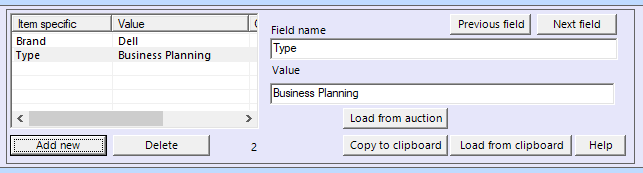
and add these item specifics.
You have to do the same thing if you create an auction on the eBay website:
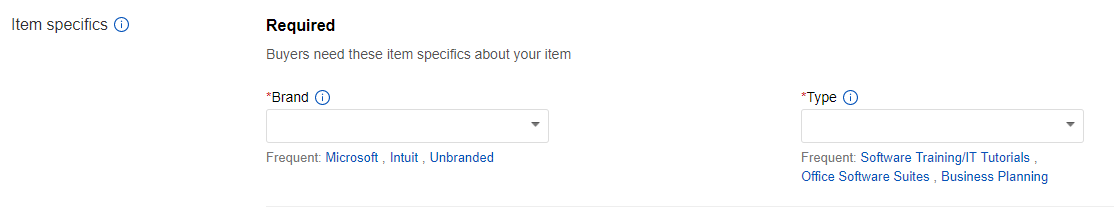
so it can easiest to create your first listings on eBay, then download it on the 'eBay auctions' tab and you can then use the 'Copy to new' button.
International Selling Agreement
If you set up International selling options to say that you will post items directly to worldwide eBay buyers, then you have to accept the Internatioal Selling Agreement on your eBay account. You wil get messages like:
You must accept the International Selling Agreement before you can list this item on a site other than where you registered or with international postage options. If you prefer not to accept this agreement, you will need to list only where you registered and choose local postage options in this tool before resubmitting your listing. Please visit https://scgi.ebay.co.uk/ws/eBayISAPI.dll?UserAgreement&agrid=7&aid=1&ru=http%3A%2F%2Fmy.ebay.co.uk%2Fws%2FeBayISAPI.dll%3FMyeBay&fId=4 to accept these terms.
when you try to publish an auction otherwise.
Overwriting an existing auction on eBay with a stock auction (NOTE - Overwrite auctions is a feature of the Jumble Saler STANDARD edition and higher)
If your eBay account is registered with eBay as a private seller, rather than a business seller, then normally you will get seller fee offers every two weeks. Offers such as "70% off selling fees" are common which allow you to list up to 100 items with the seller fees discount applied. This saves loads of money in fees. If you create "place holder" auctions in your eBay account with titles like "Listing and pictures coming soon 001", "Listing and pictures coming soon 002", etc. eBay doesn't allow you to have multiple listings with the same title, so
Generally, if you have hundreds of listings, you are better off with multiple private seller accounts as you can list your auctions with seller fee offers applied, saving a lot of money in fees and with no monthly shop or account charges. Private eBay accounts also advertise your listings on all international sites as long as you either opt into 'eBay Global Shipping' or have international delivery charges set up.
See Overwriting eBay auctions and the benefits of using place holder auctions.