Stock system fields for general products plus comics and magazines
The Jumble Saler Stock System was originally designed for comics, where a single issue could be graded on a standard 10 point grading system.
See: CGC Grading Scales | CGC (cgccomics.com)
You can choose to use different fields in the stock system to record how many of each quality you have for a specific comic.
You can use the same concept on other products, such as books:
New
Like New
Very good
Good
Acceptable
and each stock level can have it's own price. If you have ever listed a book on eBay, you will be familar with these types of grades.
Defaults buttons
General/books load defaults looks like:
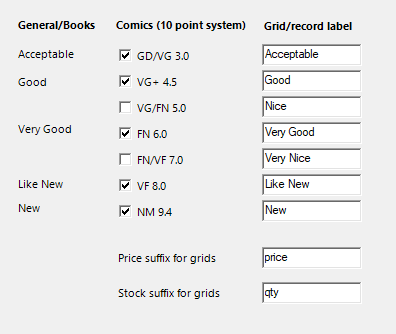
and Comics defaults looks like:
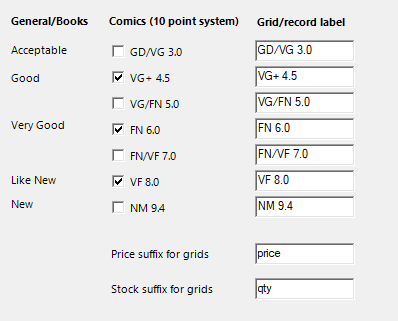
Stock system fields on a product group by product group basis
Setting up boxes at system level, means that these are the defaults for all your products. However, if you sold say Books and Comics, you would want different boxes depending on your product group.
If you go to the product groups screen (see below), then you can customer on a group by group basis, so that different boxes are shown depending on which product group you have clicked on in the stock system.
To go to the groups screen, on the main Jumble Saler screen, click the Stock tab and then use the 'Groups' button in the bottom left corner.