Creating items
This screen will work differently depending on how many variations or drop down boxes you have for your multi listing.
If you just have 1, for example 'Size' with a particual T-Shirt, e.g:
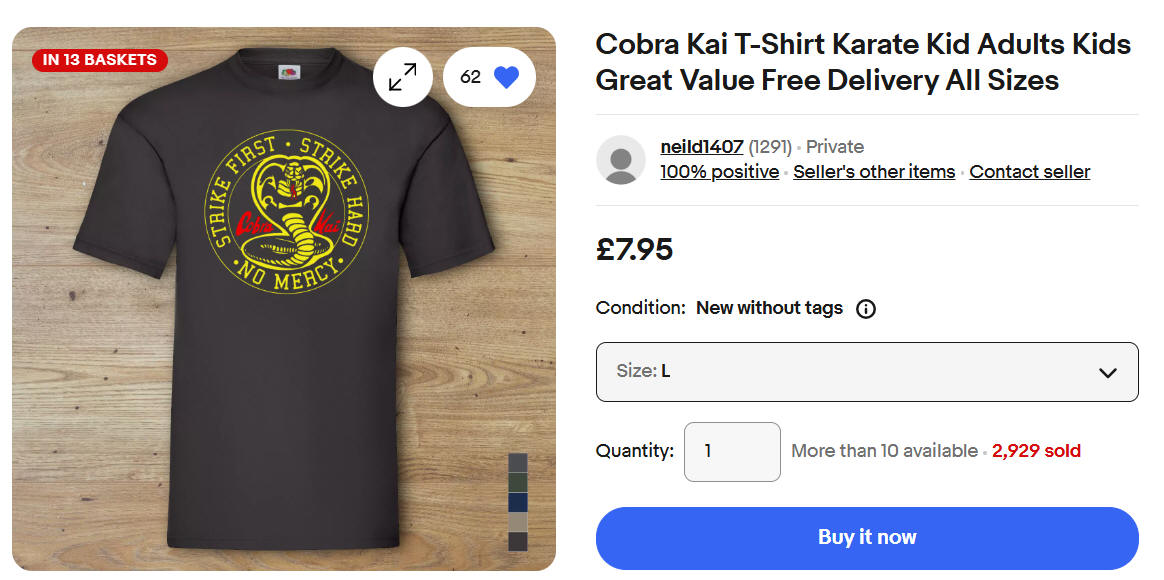
Then you can just add new products using this screen.
You are limited to 30 characters for the name and you must also specify a quantity, price and a 'SKU'. A SKU is a unique item product code or reference number for the item and is required as this is needed when you use Jumble Saler to update the listing. In the T-Shire example above, there may only be 4 sizes:
S
M
L
XL
So the SKU can be exactly the same as the Size, infact, if you don't specify one, then Jumble Saler will automatically use this for the SKU value. If you don't specify a SKU, Jumble Saler will use the same name, such as S, M, L, etc instead.
Where you have 2 or more variations (drop down lists), then you have to specify a list of values on the Variations setup screen instead:
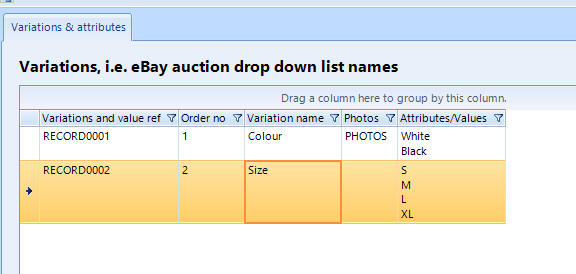
and then Jumble saler will automatically generate an item for every combination of your variations. In the picture above, we have 2 T-Shirt colours and 4 sizes, which Jumble Saler would generate into 8 items:
White S
White M
White L
White XL
Black S
Black M
Black L
Black XL
and then you can edit the prices and quantities. If you didn't have White in size L, then just leave the quantity as ZERO and it won't appear when you send your listing to eBay.