Jumble Saler Stock System edition
Quick introduction
Jumble Saler
Stock System edition is paid subscription based software that has all the features of the Jumble Saler FREE edition and Jumble Saler Standard edition and allowing sellers to quickly create eBay listings on their
Windows computer without Internet access, and then publish them to eBay when they are
ready.
Jumble Saler
Stock System is designed for new or used products where you are selling hundreds or thousands of items and have multiple copies of the same items. For example, you may sell books and have 10 copies of 1 particular book. Jumble Saler also supports different grades, so if you have 10 copies of a book, 5 might be NEW and the other 5 may be used or have slight damage. So in this case the product is the same but you have 5 new and 5 used. With Jumble Saler, you can set up multiple stock boxes and then "mail merge" your products to eBay listings with different pictures/descriptions based.
There are a lot of advantages to the Jumble Saler Stock System:
1. Sell 1 of a product at a time and then when that sells the next each auction is automatically created for you. This is useful for rare products where you have several of the same items.
2. When you sell an item on eBay, then stock is automatically knocked off the stock figures.
3. Easily batch update pricing. You can also export your listings to Microsoft Excel (CSV format) or another spreadsheet, make updates and the import back in.
5. Create you eBay auction templates and use Jumble Saler Background Image Templates to highlight your listings and promote what you do in pictures.
The system was originally designed to sell comics, so has full support for volume numbers, issue numbers and issue dates.
Getting started and trialing the Stock System Edition
Jumble Saler is Windows based software and supports Windows 10/11. Download and install Jumble Saler and try out Jumble Saler FREE edition. With the Jumble Saler FREE edition you can see and use all features of the Stock System including setting up mail-merged auctions, but you cannot publish the final mail merged auctions eBay without a paid licence.
Then follow this help page Stock System walkthrough using sample data to mail merge stock to eBay auctions. There is a bit of learning curve getting started, mainly because it takes you through intitially importing products, but Jumble Sales is incredibly flexible and also includes an in
Stock edition features
 |
Use of the Jumble Saler Stock System which allows you to keep an inventory items and then mail merge products to eBay.
When items are sold, stock figures are automatically updated.
When you manually add stock, then new auctions are automatically created for you ready to send to eBay.
When you manually remove stock, then any live auctions that no longer have sufficent stock (based on flexible rules), will automatically be ended.
|
 |
Supports multiple eBay accounts and allows
moving eBay auctions from one eBay account to another. This is especially useful when you get different selling offers on different accounts. For example, we often get "70% off selling fees" offers on some of our eBay accounts but not on others, and then next month, the offers are on different accounts.
|
 |
Enhance your eBay listings with Jumble Saler background image templates. Put your auction pictures within a template that shows your pictures at the maximum size and include your logos, name, and text. Even send optional text for each of your pictures.
For example, the first ebay search result is enhanced using a picture template and uses all the available space::
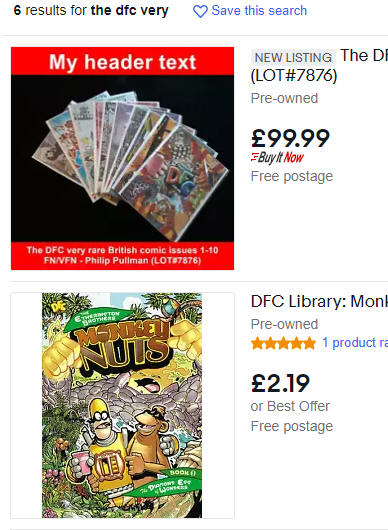
System includes a fully flexible template system with built-in designer with support for landscape and portrait shapes auction images.


Fully flexible system, so that different templates could even be used for any of the 12 pictures eBay allows per listings. Normally, you could just have a template for the main picture, and then ones for additional pictures with optional passed text. You can even add a general picture advert for your eBay business as a picture at the end of your item pictures.
In example, Picture 1 below uses a "main picture" template to display the first picture plus images of the 2nd and 3rd pictures of the auction. Pictures 2 and Picture 3 below using an 'Additional pictures' template for the individual pictures. The last picture is just an 'Advert' template to tell buyers why they should buy with confidence from this seller:

On Picture 2 and Picture 3 above, we have also passed text to display on the pictures (see bottom of picture below), so you can highlight features and clarify the condition on used items:

All completely customisable. See our Jumble Saler Background image Templates - Advanced walkthrough for step by step instructions on how to use and customise our templates.
|
 |
Add information about you, your packaging, your service and whether you combine delivery to the bottom of all your auctions automatically. Jumble Saler Standard allows different description templates (HTML) to be used for different auctions and also you can automatically add different custom item specifics to auctions published to different eBay accounts.
|
 |
Jumble Saler income tracking system allows you to keep a record of your sales and purchases, both from eBay and elsewhere.
The Standard and Stock System editions support multiple eBay accounts so that you can see your sales and purchases across multiple accounts. This is useful to see your net income on sales, so that you can make decisions like increasing your postage charges or start prices.
|
 |
Additional buttons and features including "Overwrite existing auction", export buttons and Text list.
|
Pricing
Jumble Saler
Stock System is available via a monthly paid subscription:
| Currency |
Monthly |
| |
|
| Australian dollars AUD |
$53.99
|
| British pounds GBP |
£29.99+VAT
|
| Canadian dollars CAD |
$49.99
|
| Euros EUR |
€34.99
|
| US dollars USD |
$36.99
|
Monthly prices - Purchased in blocks of 3 months. Discounts for buying 6 months or 12 months.
The Stock System edition is about time saving. After set up of a mail merge, you can easily send hundreds or even thousands of auctions to eBay automatically and then manage the stock using the stock system. The investment in Jumble Saler gives a massive reduction in the staff hours spent on listing eBay items, and allows you to put lower priced items on individually, which you may not have had the staff hours available for before.
At the start of 2022, this comics business has imported comic products along with stock quantities and prices at different grades and then used Jumble Saler Stock System edition to automatically create 10,000+ additional auctions, with many of the same issue of comic but in different grades and prices.
Jumble Saler sales them hours of time every week. When a new comic collection arrives, they check, grade and sort issues into piles and then new stock is data inputted into Jumble Saler. This doesn't mean that they use the stock system for all of their eBay auctions. They still use Jumble Saler for creating individual auctions for piles of low grade comics that go straight back on eBay and also for high priced, special, or very rare issues.
The additional benefit of having an extra 10,000 individual eBay Buy-it-now auction listings, is that each one is effectively a free advert for their business which helps promote their brand to both UK and International buyers.