NOTE - Background image templates are a feature of the Jumble Saler STANDARD edition and higher. You can test them in the Jumble Saler FREE edition, but you will not be able to publish your auctions with them. You can preview how they would look by setting one up and previewing on of your new auctions.
Save money using place holder auctions at eBay - Plus Jumble Saler tools to help you do this
If your eBay account is registered with eBay as a private seller, rather than a business seller, then normally you will get seller fee offers every two weeks. Offers such as "70% off selling fees" are common which allow you to list up to 100 items with the seller fees discount applied. This saves loads of money in fees. If you create "place holder" auctions in your eBay account with titles like "Listing and pictures coming soon 001", "Listing and pictures coming soon 002", etc. eBay doesn't allow you to have multiple listings with the same title, so just make sure each is slighly different.
With Private eBay accounts, you may get 300 new auctions per month, but they will continue on indefinately, with no renewal fees, so use all 300 in January, say selling 50 and have 250 live left, then in February you get another 300, so you can then have 550 live listings.
With Business eBay accounts, you are limited to the number of Buy-it-now auctions you have per month. If you are up to your limit, you could overwrite listings for cheaper items, with new more expensive ones. Unfortunately, if you have 300 listings per month, then that's your maximum without paying fees every month for additional items, then get charged again if they don't sell in a month.
Jumble Saler will help you create multiple place holder auctions by creating one and then Jumble Saler with duplicate this with unique numbers in the title for as many as you like. See the bottom of this help page on how to do it.
Multi variation listings (listing with drop down boxes) - LIMITATIONS TO OVERWRITING
eBay unfortunately doesn't allow you to overwrite normal listings with multi variation listings, or visa versa. There is also issues if you try to overwrite an existing multi varation listing, that doesn't have the same drop down list titles, so eBay won't allow you to do that either.
Jumble Saler overwrite auctions screen
Create your new eBay auctions on the 'New auction lots' tab as normal. Then highlight one or more and click on the 'Overwrite' button. You can then search for your place holder auctions. In the account below, the use is using 'Test Buy-it-now - please ignore this 119' and other numbers. 3 of these have been selected to make the 3 new auctions:
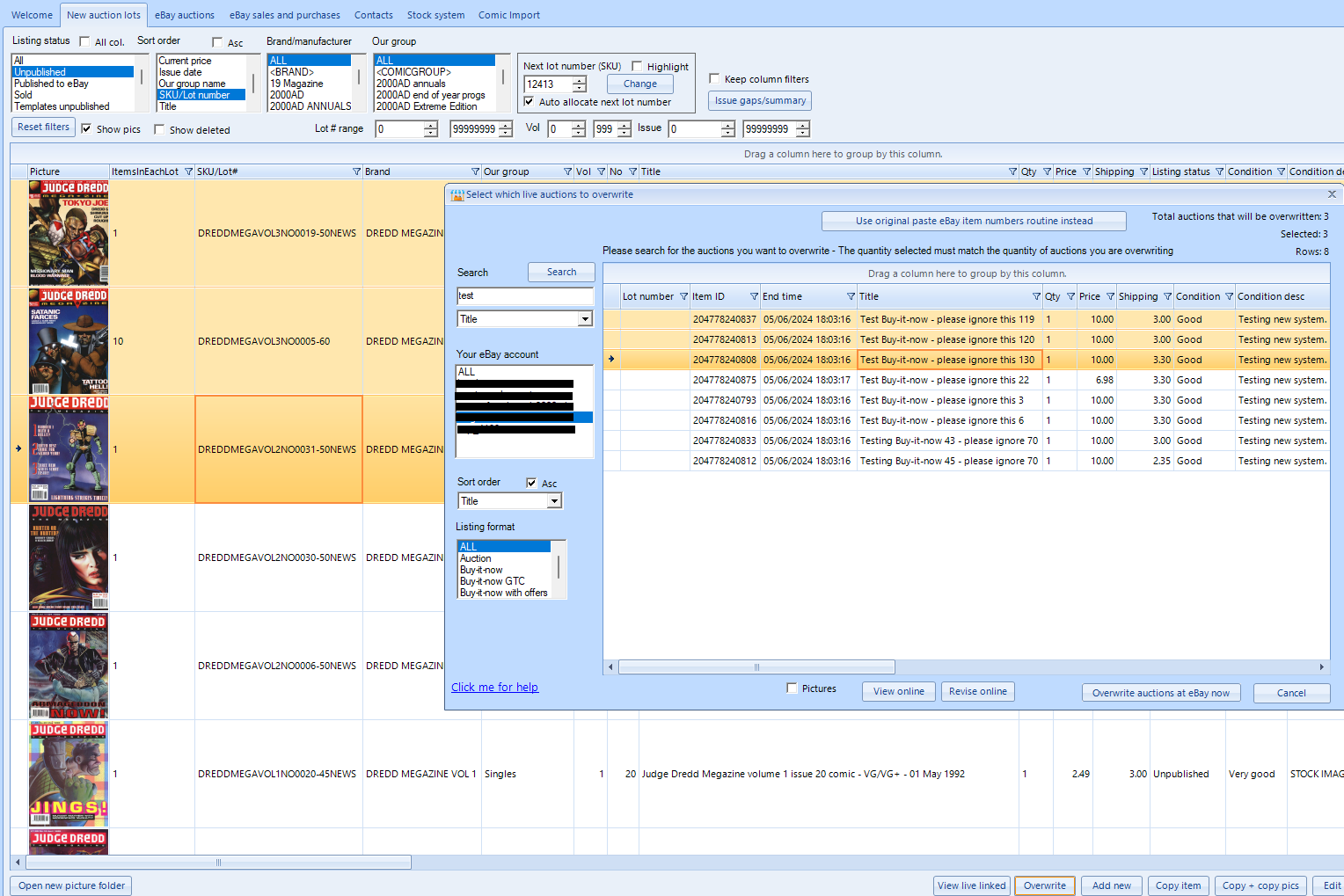
Then clicking in the 'Overwrite auctions at eBay now' button will send the changes.
Automatically creating dozens or hundreds of Buy-it-now place holder auctions using Jumble Saler
You will need to create a template auction in 'New auction lots'. It needs to have XXXX in the title which is what will be replacd with 0001, 0002, 0003, etc for the unique titles. For example, we have created an auction called 'Details and prices comiing soon XXXX', then then we used the Tools => Place holder auctions => 'Copy selected New Auction Lots to place holder auctions' menu option:
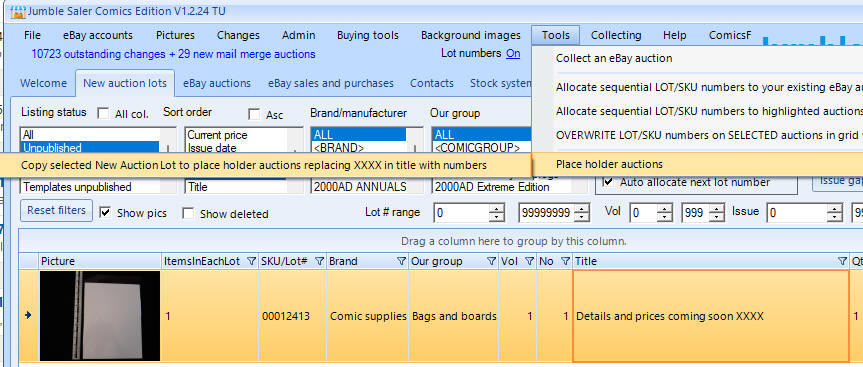
which then asks:
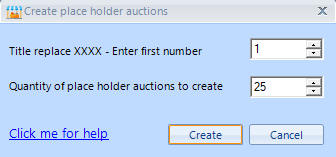
and then click on Creation to generate your auctions.
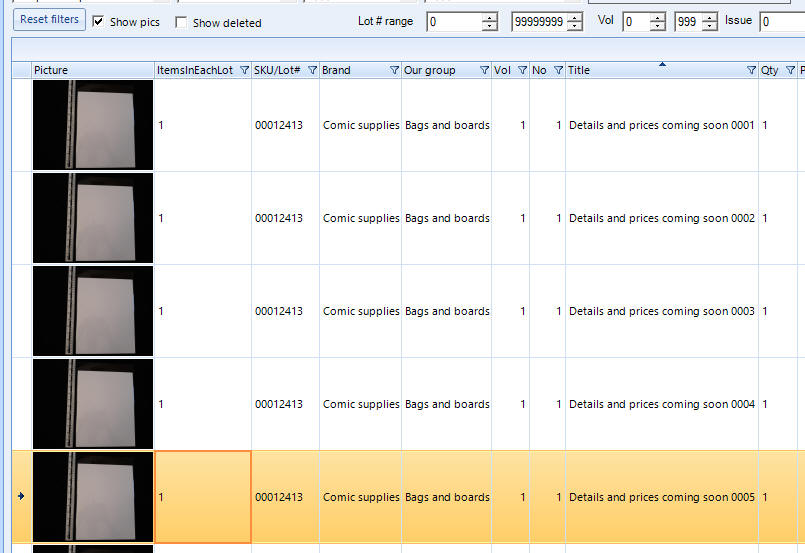
When you have these, they are ready to be sent to eBay. So when you have the '70% off sellers fees' type offer, then activate this and send your placeholder auctions. The offers tend to last 30 days on Buy-it-now auctions.
You can then use these in a couple of ways:
1. When you have new items, especially high value ones, then you can create in Jumble Saler and then over write them using the Jumble Saler overwrite button.
2. When a potential buyer contacts you to combine postage on several items, you can just manually change one of the place holders online as a quote and list the original auctions in the description. That way, they can buy together but your seller fees are then minimum.